What is my ip ? #ipaddressmeaning,
.
🧠 What Is My IP?
✅ “IP” #ipaddressmeaning, for Internet Protocol
Think of it like a home address, but for your device on the internet.
📶 What Is an IP Address? #whatistheipaddeess,
An IP address is a unique number that identifies your device on a network — like the internet or your home Wi-Fi.An IP address, or Internet Protocol address, is a unique numerical label assigned to each device connected to a computer network that uses the Internet Protocol for communication. It acts like a digital address, allowing devices to send and receive information over the internet or a local network.
- main purposes: they identify a specific device (or network interface) and indicate its location within the network. #ipaddressimportance
- Routing:They are essential for routing internet traffic. When you send data, your device’s IP address (source) and the recipient’s IP address (destination) are used to ensure the data reaches the correct destination.
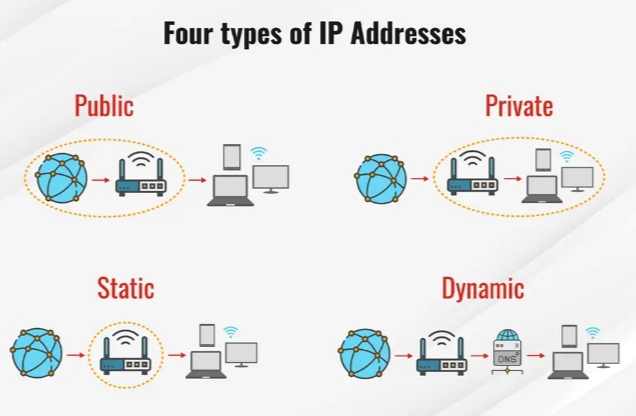
- Dynamic vs. Static:IP addresses can be dynamic (assigned temporarily and can change) or static (fixed and don’t change).
- Importance:Without IP addresses, devices couldn’t communicate with each other on the internet, and the web as we know it wouldn’t exist.
- An IP address serves two principal functions: it identifies the host, or more specifically, its network interface, and it provides the location of the host in the network, and thus, the capability of establishing a path to that host. Its role has been characterized as follows: “A name indicates what we seek. An address indicates where it is. A route indicates how to get there.”[2] The header of each IP packet contains the IP address of the sending host and that of the destination host.
🔢 What Does an IP Address Look Like?
There are two main types of IP addresses: #ipaddresslocation,
1. IPv4 (most common):
Looks like this:
📍192.168.1.1
It’s 4 sets of numbers from 0 to 255.
2. IPv6 (newer):
Looks like this:
📍2001:0db8:85a3:0000:0000:8a2e:0370:7334
It’s longer because we’re running out of IPv4 addresses.
💻 Why Do You Have an IP Address? #ipaddressimlortance,
To use the internet, your device needs to:
- Send data (like clicking a website)
- Receive data (like loading a webpage)
To do that, the internet needs to know where to send the info. That’s what your IP address is for.
🌍 Public vs. Private IP
| Type | What It Is | Example |
|---|---|---|
| Public IP | Your internet “face” to the world | What websites see |
| Private IP | Used inside your home network | For your devices |
📡 Simple Analogy:
Imagine a post office:
- Your public IP is like your building address
- Your private IP is like the apartment number inside that building
🧭 How Can I Find My IP Address?
1. Search “What is my IP” on Google
You’ll see your public IP right away.
2. On Windows/Mac
You can find both public and private IPs in your network settings.
📷 Diagrams
🌐 How Your Device Talks to the Internet:
scssCopy code[Your Phone] --> [Router] --> [ISP] --> 🌍 [Internet]
     (Private IP)    (Public IP)
🏠 IPs in a Home Network:
nginxCopy codeRouter (Public IP: 83.45.33.10)
  ├── Phone (Private IP: 192.168.0.2)
  ├── Laptop (Private IP: 192.168.0.3)
  └── Smart TV (Private IP: 192.168.0.4)
🔐 Is My IP Address Private?
Not really. Your public IP is visible to websites, apps, and online services.
That’s why many people use a VPN (Virtual Private Network) to hide or change their public IP for privacy or security.
🔁 Do IP Addresses Change?
Yes! Most home networks use dynamic IPs — they change from time to time.
If you want a permanent one, that’s called a static IP.
🛠️ What Can Someone Do With My IP?
Usually, not much — but it can reveal your general location (like city or region).
Hackers might try to scan for open ports, but with a firewall and router, you’re usually safe.
✅ In Short:
- Your IP address is your device’s internet ID.
- It helps devices find and talk to each other.
- There are private and public IPs.
- You can look it up easily and even change or hide it with a VPN.
https://youtube.com/@mohinirathore4007?si=QnR1CmtKQcmSYy3L